Login Logic: Unlocking the Secrets of Secure Sign-Ins
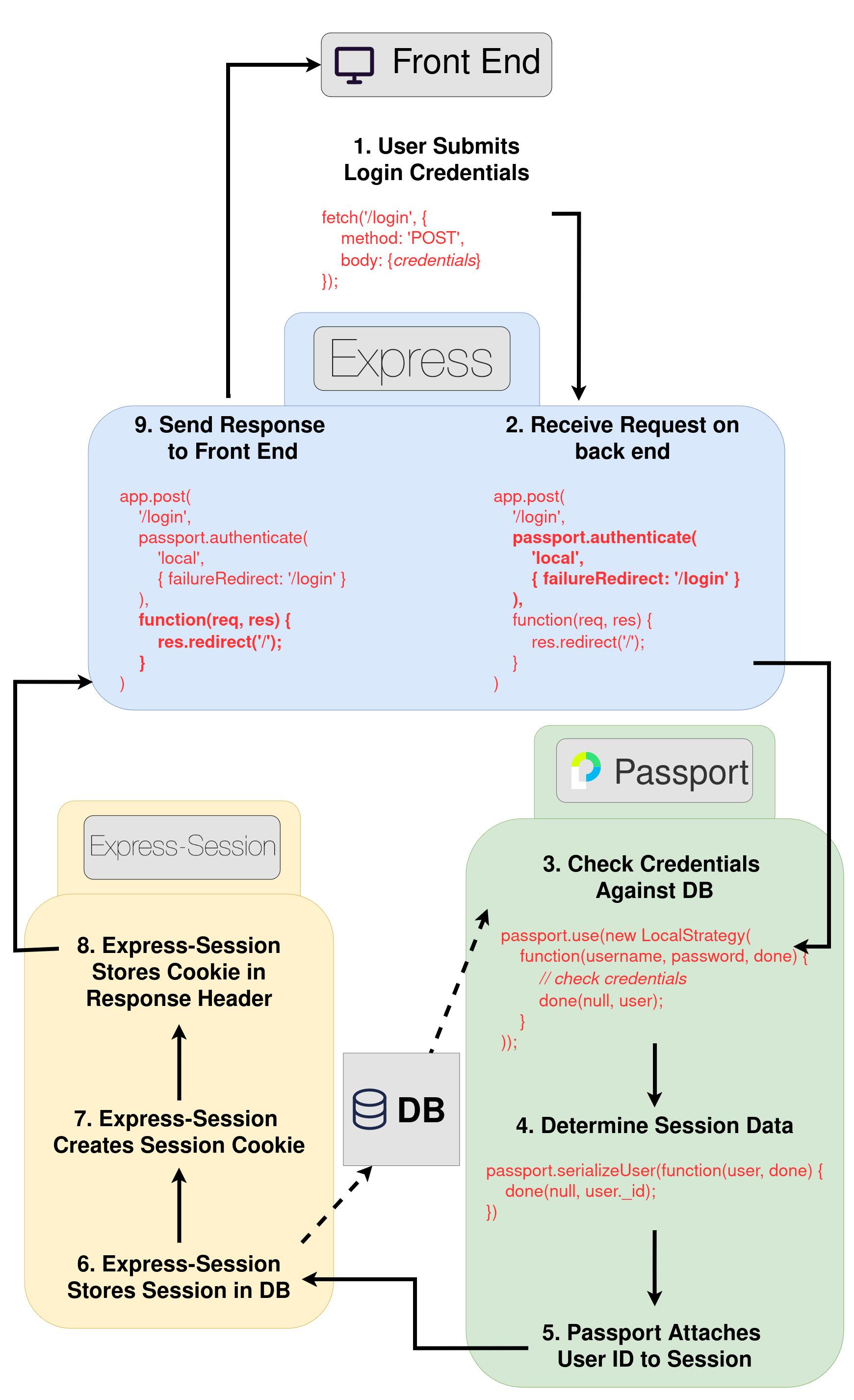
Express, Express-Session, and Passport.js are powerful tools that greatly simplify the process of handling authentication in a web application. However, even with these tools, there are still many moving parts to understand and implement correctly. That's why I wanted to create a step-by-step explanation and diagram to illustrate how I recently used these technologies to add authentication to a business app.
In this post, we'll focus on the 'local' authentication strategy, which typically involves using a username and password. I'll walk you through each step of the process, from the user submitting their credentials to the server sending a response back to the client.
User submits login credentials
The user enters their login credentials (usually username and password) on the login page and submits the form.Receive request on back end
The server, leveraging Express, receives the login request and prepares to authenticate the user with Passport's 'local' strategy.Check credentials against database
Using Passport's LocalStrategy, the server validates the submitted credentials against the stored user data in the database.Determine session data
Successful authentication triggers Passport's serializeUser function, deciding which user data (here, the user's ID) is saved in the session.Passport attaches user ID to session
This step, handled internally by Passport, involves linking the user's ID to the newly created session, marking the beginning of the session management.Express-Session stores session in database
Express-Session takes over to store the session information server-side, including the user ID.Express-Session creates session cookie
A session cookie, with a unique session ID, is generated by Express-Session.Express-Session stores cookie in response header
The session cookie is stored in the response header, allowing the client to include it in subsequent requests to maintain the session state.Send response to front end
The server sends the response back to the client, typically redirecting the user to a protected page or sending a success message.